Showing posts with label HOW TO...... Show all posts

How to corrupt pdf files

How to corrupt pdf files

Seems ppl would have questions in their head such as "Wtf would i wanna corrupt my pdf file?" , "I dont wanna to corrupt it, i wanna fix the corrupted pdf!"

Answers
"I dont wanna to corrupt it, i wanna fix the corrupted pdf!"
-u come to the wrong post, dude.

"Wtf would i wanna corrupt my pdf file?"
-not just yours, you can corrupt other's too. see the picture now?

I posted this tutorial because i did this yesterday, my lecturer asked me to send my thesis in pdf file, well of course my thesis still incomplete, suppose to submit it yesterday. so i decided to 'fake' or 'corrupt' a pdf file and submit it to my lecturer. why? the reason is pretty simple.

-she asked me to send a pdf file of my thesis
>> sent. but she didnt say "not corrupted"
>> so, by right, i did sent my thesis, but eventually during the burning to CD process, something bad happen and corrupted that pdf file. so i have two days to send another copy (which means i have two days extra to complete my thesis.)

so,end of story, lets go straight to the tutorial.

its pretty simple.

  1. choose a pdf file.
  2. make a backup (in case u need it)
  3. right-click on it
  4. open with......
  5. choose "notepad"
  6. it will be a bit laggy, especially if the pdf file size is big.
  7. just wait until the notepad fully loaded and with massive unknown commands and characters
  8. select 7-8lines of the commands and characters (i selected half of the page.)
  9. delete the selection.
  10. save
  11. open the pdf file.
  12. voila!!! it is corrupted.
  13. u can try to do this with a cool way,
  • open the pdf file with a binary editor
  • search the bookmark /root
  • replace the value with '00'


REMEMBER:
dont do the same gag twice. which means, in my case, i just did this trick to that lecturer once, and wont repeat it, so i wont blew my bluff. if u wanna to trick again, do the other gag such as "assignment with virus embedded" so every pc that opens ur files will shutdown/restart/hangs over and over again

any questions, straight to the comments

Read Users' Comments (0)

How to Add Mp3 player ( Music BackGround ) for blogger,

How to Add Mp3 player ( Music BackGround ) for blogger. ( requested by Ariff)

Here's step-by-step tutorial on how to add mp3/mp4 player into your blog.with pics.simple (and lazy) edit.

Firstly, go to http://www.mixpod.com  , register a free account, just takes a couple of minutes tho.simple.

Next, choose your mp3 style

 
-Click 'Create a playlist'-


Next, there are two ways to add songs to your playlist;
  • Search the site database, it’s easy and I think you’ll find what you are looking for
  • Add new music file by adding it’s URL
I just searched the site's database.And get my songs.Simple.

  1. Type a keyword to search the database, and find your song
  2. Click on add ( + ) icon next to it . Simple.
Next,saving your playlist and Getting the code

 
  1. Check whether your songs are already insert into your playlist
  2. Name of your playlist
  3. Save, and get your code.Simple.

Read Users' Comments (0)

What You Should NOT Install in Your Computer

What You Should NOT Install in Your Computer

The following is a list of some types of software that I don't recommend you use: 

Read Users' Comments (0)

How to fix Error 80244019


Error 80244019 
When Updating Windows VistaA machine one could not run Windows Update and complete an update of Windows Vista. Every time the update would fail with Error 80244019. This error message indicates there is a problem reaching the update server, however this explanation does not make sense since other computers on my network including another Vista machine can access the Internet and update properly.

Read Users' Comments (0)

How to create a Nokia Ovi Mail

 Click to this link,  

Nokia has intoduced new mail its name ovi mail.its so nice & it has some

new features.

To create new ovi mail go to this link to creat ur ovi mail account.


https://account.nokia.com/acct/register?serviceId=Ovicom&lid=registerherobtnnli&lang=en-US

Read Users' Comments (0)

How to make upside down / Flip Text in Facebook

 How to make upside down/ Flip text in Facebook ( or on the web ) like this :

: sıɥʇ ǝʞıl ( qǝʍ ǝɥʇ uo ɹo ) ʞooqǝɔɐℲ uı ʇxǝʇ dılℲ /uʍop ǝpısdn ǝʞɐɯ oʇ ʍoH

This fun trick can  be use by all, u just need to generate the text u want, and copy ,then paste it @ ur Facebook status ,also comment ppl's status, or paste it at ur BLOG. lol. nice eh.

To generate the text, go to http://www.upsidedowntext.com/

Just tested: works on YM.nice.

Read Users' Comments (0)

How to fix BLUE SCREEN OF DEATH on windows XP

Has your computer ever gotten the "Blue Screen of Death"? OK, that name might be a bit over dramatic, but it has become very famous through the years of the Windows operating system. One day everything is going fine, and you're your pounding away on the keyboard when it happens. Your screen disappears and a blue one pops up in its place with a cryptic message saying windows has encounter an error and must shut down. Then it gives a lot of numbers in the form of 'OOxOOOOOO (OOxOOOOOO) etc...).


Read Users' Comments (0)

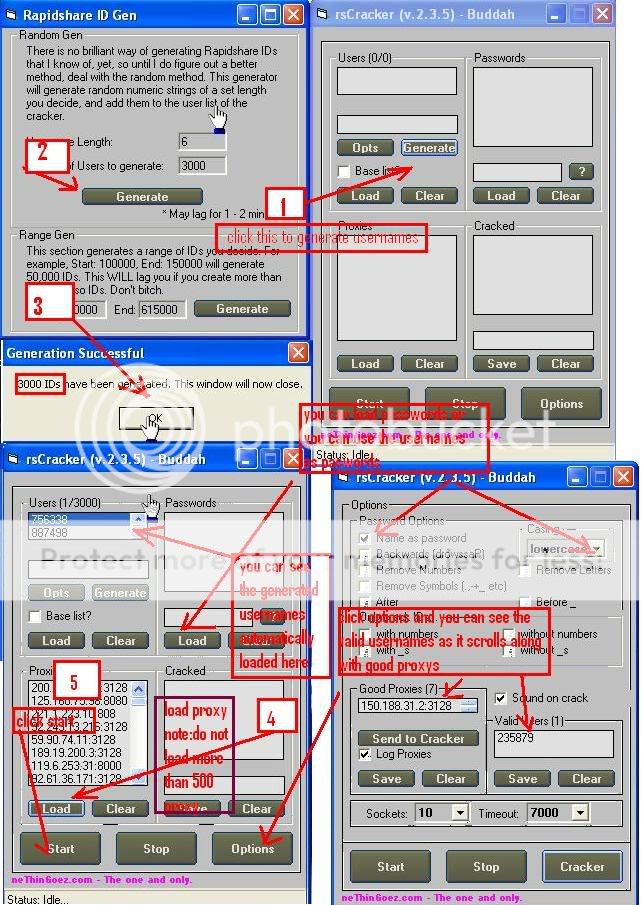
How to crack a RShare Account

How to crack a Rapidshare Account

To watch the tutorial, download the video by clicking HERE

(The success rate of cracking an account depends on YOUR password list, and YOUR username list. and of course, the leeched proxies and all that. Crack smart, dont crack hard)

I had simplify the steps;


Read Users' Comments (0)

How to bypass blocked websites by your school or office

How to bypass blocked websites by your school or office or even institute.lolx.

  1. Install HotSpot Shield. U can download it in Security Section.
  2. Then on the toolbar on ur right handside, u will see the shortcut icon right
  3. Click on the icon then press connect
  4. It will be connecting like it show assigning a ip address.And it will show connected and then show the homepage
  5. Then u can type any site u want . Check with me back if u have further inquiries.

Read Users' Comments (0)

How to hack Friendster account phishing

How to hack Friendster account via phishing

If any of u doesnt know what 'phishing' is, google it.

Lets start:

Read Users' Comments (0)

How to make your PC Talk - Simple trick

Now you can create your own text to speech converter software to make your computer speak whatever you type. Just run this script and make it read any funny sentence.Copy the code given below in notepad and save it as anyname.vbs Make sure that you save it as .vbs file.


Dim message, sapi
message=InputBox("What do you want me to say?","Speak to Me")
Set sapi=CreateObject("sapi.spvoice")
sapi.Speak message


Screenshot:


Read Users' Comments (0)

How to do a simple prank on your friend's computer

How to do a SIMPLE prank on your friend's computer ( ur family or anyone else, u name it)

1. First make sure nothing is open like a web-browser, notepad or anything.

2. Then put the mouse is all the way to the bottom right so it’s not showing.

3. Then hit the prt scr button for screen shot.

4. Then open paint on their pc and paste that screen shot.

5. Save it to their desktop as screenshot or something then close paint.

6. Then right click on their desktop and highlight "arrange icons by" then uncheck show desktop icons. (View, then uncheck Show Desktop Icons on Vista)

7. You should have a plain looking desktop.

8. Ok now right click their taskbar and uncheck lock the taskbar.

9. Then click on the middle of the taskbar and drag it all the way up top.

10. Now right click on it again and pick properties, put a check in the "auto-hide the taskbar" and then apply it or click ok.

11. Now right click on their desktop and pick properties. (Personalize on Vista)

12. Hit desktop tab. (Desktop Background on Vista)

13. Browse to their desktop and pick the screenshot you saved a minute ago as their background.

14. Now watch them try clicking start or any of the icons.

15. Enjoy the sound of them clicking on stuff like crazy.

Read Users' Comments (0)

How to speed up Firefox

How to speed up Firefox

1. Open up FF click into the Firefox address location bar, and type about:config , press Enter.

2. The "Config" file will appear in the Firefox browser as a page with hundreds of lines of code in it. Now, we start by enabling some advanced tabbed options:

3. Locate the line browser.tabs.show Single Window Mode Prefs . (tip: press "b" on your keyboard to quick scroll).

4. Double click on browser.tabs.show Single Window Mode Prefs . This will set its toggle to "true". Now your advanced and enhanced tabbing should be set.

5. Next: we will increase the "pipeline" RAM ability for Firefox to accommodate more packet transfer. In the same config document, scroll down to the line that says network.http.pipe lining . Double click this line to set it to "true".

6. Lastly, we will increase the maximum pipeline requests to 100. Find the line that says network.http.pipe lining.max-requests . Double click on it, and a dialog box will pop up. Change the setting from 4 to 100.

7. No need to save this file. Simply close and restart Firefox, and you should see an immediate 10% to 40% increase in web page transfer speed, and faster opening of your tabbed windows! Enjoy!

Read Users' Comments (0)

How to increase Laptop's Battery Life

How to increase Laptop's Battery Life - ( of coz for laptop users.duh )

Mobile computing has got better with lighter components, better chips and faster processors. But the Achilles heel of a laptop has remained its battery. So here are we are going to look at ways to increase laptop battery life.

Read Users' Comments (0)

How to view invisible person in Yahoo Messenger

Ever thought of certain people maybe invisible in Yahoo Messenger? Want to caught them?

Or do u want to download their avatar to be saved in ur disk?

Here's the simplest way to know/view certain users are invisible (without any downloads)

  1. Go to ur browser and type or paste this address http://detectinvisible.com/ or just click here
  2. There's an empty space for u to fill in the user's ID. ( to get user's ID, click on their names in ur YahooMessenger and on top of it, the username is visible.or simply type in their yahoo address xxxxx@yahoo.com without @yahoo.com)
  3. Then, click GO. Voila!! The user's status will shown as Invisible, Online, Offline. Easy.
I do this for fun only, some people being invisible maybe due to their needs of privacy. So, respect their privacy.lolx.

Read Users' Comments (0)